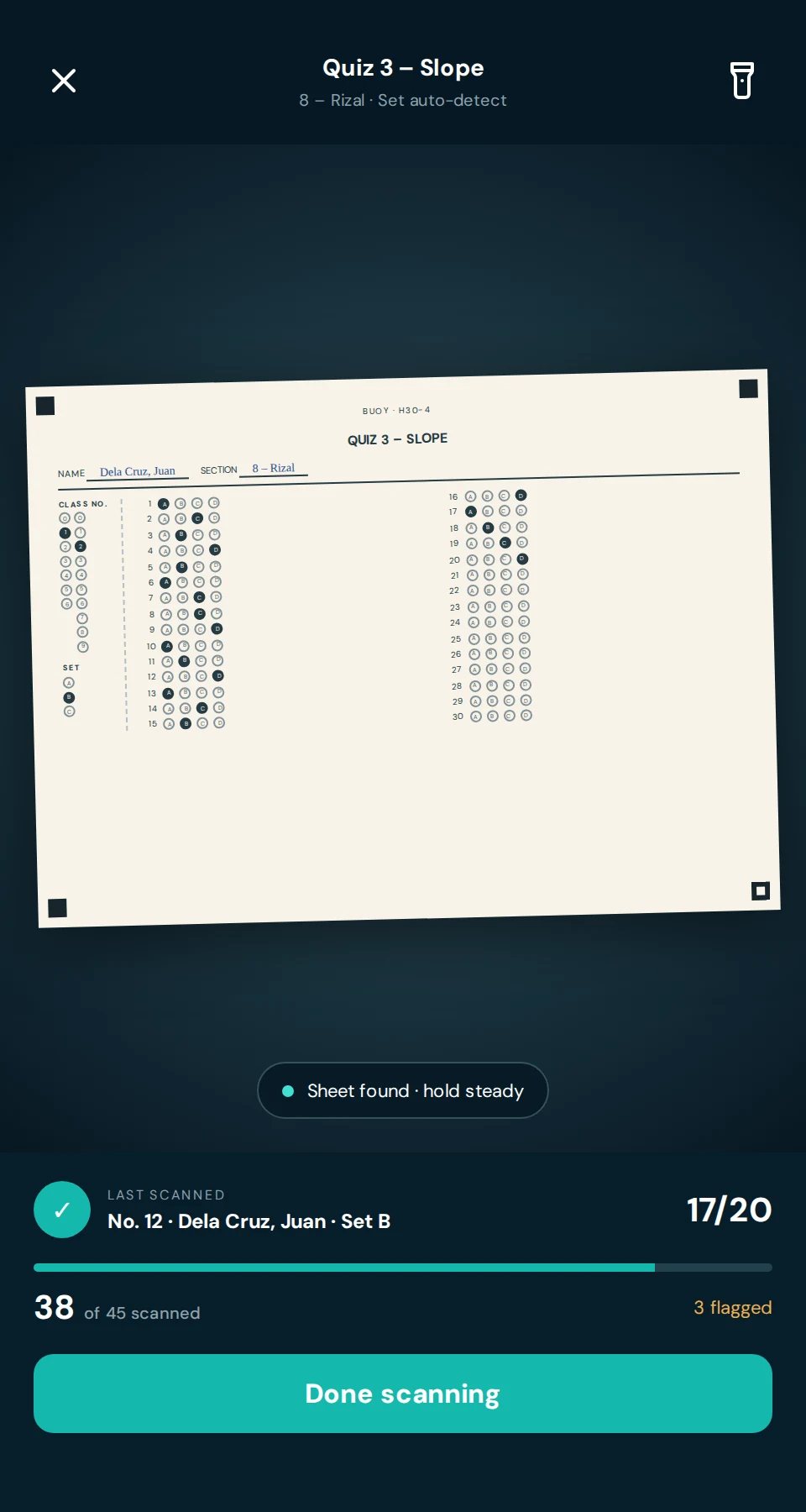
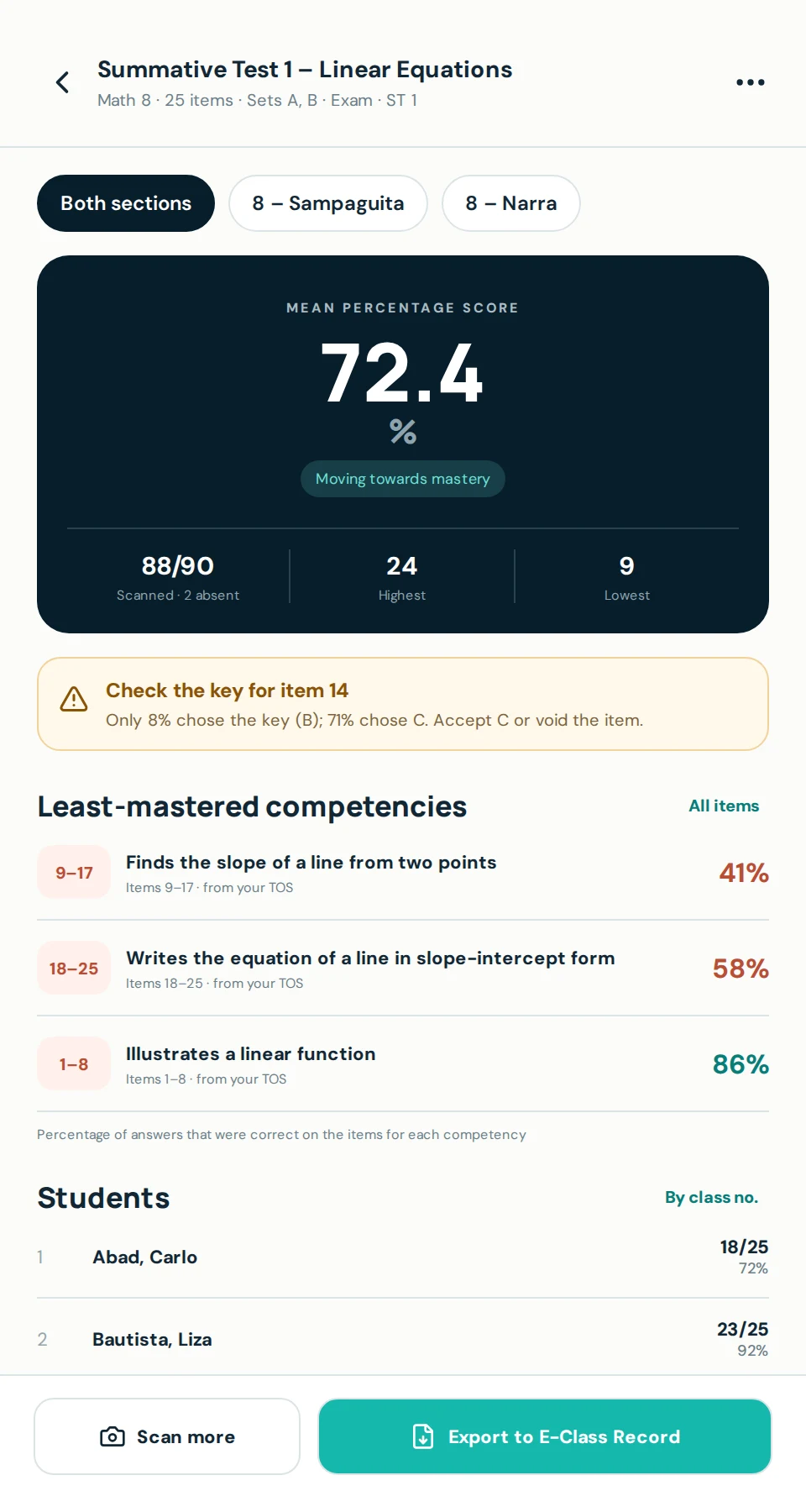
Lighthouse is the portal teachers, students, and parents all log in to — grading, attendance, and approvals in one connected system. Autosave gradebooks, automatic grade calculation, multi-level review, grades visible to students and their parents the moment the school publishes them, and instant parent-app alerts when their child taps in or out at the school gate or is marked absent.
“DepEd-aligned” means configurable component weights, transmutation tables, quarterly grading periods, and rounding rules that match DepEd’s grading framework — not official DepEd certification.
Most schools mix Excel, paper gradebooks, and manual report card printing. Your teachers and department heads know this dance by heart. Lighthouse lets them focus on students instead.
Enter grades from any device with automatic saving — no more lost Excel files, no version control nightmares, and no fear of losing hours of work. Break assignments into components, set their weights, and Lighthouse handles the rest.
| Component | Weight | Score |
|---|---|---|
| Quiz 1 | 20% | 88 |
| Quiz 2 | 20% | 92 |
| Project | 30% | 95 |
| Exam | 30% | 85 |
| Weighted average | 90.0 | |
Illustrative Lighthouse environment using representative Philippine school workflows. Names and figures shown are sample data.
Department heads review grades before they reach principals; principals approve before publication to families — ensuring accuracy and maintaining academic standards without email chains.
Lighthouse isn’t just for staff and parents. Every enrolled student logs in to see their own published grades, read teacher feedback, check their attendance record, and stay on top of upcoming assignments — so nothing about their own progress is a surprise.
| Subject | Quarter 2 |
|---|---|
| Mathematics | 94 |
| Science | 89 |
| English | 82 |
| Araling Panlipunan | 91 |
Illustrative Lighthouse environment using representative Philippine school workflows. Names and figures shown are sample data.
Families become active participants in the educational journey. Grade and attendance visibility the moment results are published, linked dashboards for every child, and direct teacher communication — no more lost emails or waiting for the quarterly report card.
Homeroom or period attendance with bulk actions — mark all present, copy from yesterday — with offline support and automatic sync once connectivity returns. On the same platform, the sensitive records a school has to protect: clinic and student-health workflows, and guidance and counseling records — each locked to the staff responsible for the student, and each able to reach parents with exactly what they need to know and nothing they shouldn’t.
Illustrative Lighthouse environment using representative Philippine school workflows. Names shown are sample data; clinic and guidance details are restricted to authorized staff.
Illustrative Lighthouse environment using representative Philippine school workflows. Names, times, and alerts shown are sample data.
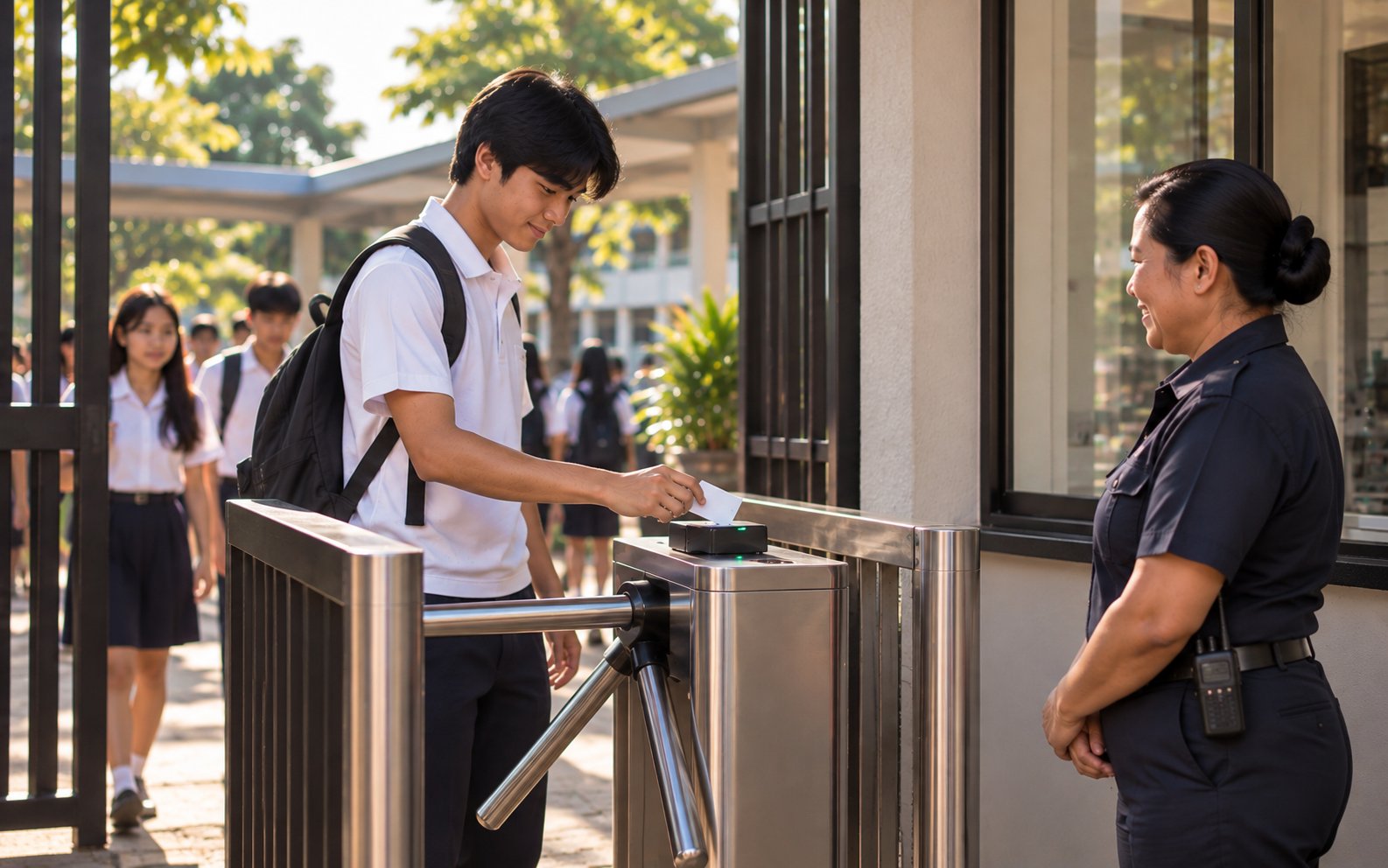
For parents, nothing matters more than knowing their child got to school safely — and that’s where Lighthouse earns its keep. When a student taps in or out at a gate terminal, their parents get an instant push notification in the Lighthouse parent app. Marked absent when they should be in class? Families hear about it that same morning, not at dismissal.
HardwareEntry/exit runs on RFID tap readers at the gate (ZKTeco terminals supported today). The terminals and cards are a one-time hardware cost the school buys and installs — separate from your Lighthouse subscription, not an added annual fee.
See the complete workflow — from a teacher’s entry to the student who earned the grade and the parent at home — without a form or sales call. Click through each step below.
Set component weights, transmutation tables, quarterly periods, and rounding rules once per department or grade level — Lighthouse applies them to every gradebook automatically.
| Component | Weight |
|---|---|
| Quiz 1 | 20% |
| Quiz 2 | 20% |
| Project | 30% |
| Exam | 30% |
| Total weight | 100% |
Step 1 of 8 — illustrative Lighthouse environment using representative Philippine school workflows. Names and figures shown are sample data.
Teachers, reviewers, students, and parents all work in the same portal. See how a single grade moves from a teacher’s gradebook to the student who earned it and the parent’s phone — no exports, no re-entry, no lost email threads. Sample journey, not a live account.
Student grades, attendance patterns, disciplinary records, and clinic visits. Lighthouse holds some of the most sensitive data your school produces — and it’s built accordingly.
Lighthouse is early — we’re working directly with our first schools rather than selling to an established base. Founding schools work directly with the OceanEd product team to configure grading rules, import class rosters, train teachers and reviewers, and prepare the parent portal for launch.
Lighthouse is a flat annual fee, banded by how many students you enroll. Year one costs more than the years after it because it includes setup, configuration, and staff training; from year two you pay the renewal rate for your band. You’re banded on your enrollment at the start of the school year and stay there until renewal, so a mid-year transfer never changes your invoice.
The 50% launch discount applies to the year-one fee only. The renewal rate is separate and lower because it carries no setup, configuration, or training.
| School size | Year onesetup, configuration & training included | Annual renewalyear 2 onward |
|---|---|---|
| Up to 50 students | Standard: | ₱7,990/yr |
| 51 – 100 students | Standard: | ₱14,990/yr |
| 101 – 200 students | Standard: | ₱24,990/yr |
| 201 – 300 students | Standard: | ₱32,990/yr |
| 301 – 400 students | Standard: | ₱39,990/yr |
| 401 – 500 students | Standard: | ₱47,990/yr |
| Above 500 students | Priced to your school — get a quote → | |
| Digital gradebook & grade calculation engine |
| Multi-level approval workflow & report cards |
| Attendance, excuses, clinic & guidance records |
| Campus entry/exit tracking with instant parent alerts |
| Parent & student portal, updated the moment grades publish |
| Harbor-backed authentication & audit logging |
| Unlimited staff accounts and sections; pricing is based on enrolled-student count |
One-time hardware, not an annual cost: campus entry/exit tracking and the parent alerts are included above. The RFID gate terminals and student cards they run on are a separate one-time purchase your school buys and installs — never part of the yearly fee.

Lighthouse works standalone. You can use it for gradebook, attendance, approvals, and the parent portal without any other OceanEd module. Schools can start with Lighthouse alone and expand into the full OceanEd system later without creating a separate student record — a student enrolled through Dock appears in Lighthouse's roster without re-entry.
Yes. Weighting, transmutation tables, and rounding rules are configured per department or grade level to match your school's existing grading policy. Teachers see the final average recalculate instantly as they enter component scores, so mistakes are caught immediately rather than after report cards print.
Teachers submit component grades as a draft. Department heads review and comment before approving; principals give final approval before grades publish to families. Reviewers can flag concerns or request clarification on any entry, and once a grade is approved it locks — reopening it requires special permission, with the change logged.
Grade entry and attendance marking are built to work offline: changes are cached on the device and sync automatically once connectivity returns. Sync behavior for edge cases — like two people editing the same record while offline, or a shared classroom device — is configured per deployment; your onboarding contact can walk through the specifics for your school's setup.
Illustrative device states shown to a teacher during and after an offline session. A conflict state surfaces for review rather than silently picking a winner — exact wording and conflict handling are confirmed for your deployment during onboarding.
Yes. Lighthouse generates school-branded report cards directly from approved grades, with draft, review, publication, and parent-view stages, and supports bulk generation and distribution to families at the end of a grading period. If your school needs a specific DepEd form generated (like SF9/Form 138), ask your onboarding contact whether it's supported for your configuration.
There's no app-store download. The Lighthouse parent portal is an installable web app — parents add it to their phone's home screen — where every linked child's grades, attendance, assignments, campus presence, and clinic records appear in one dashboard, switchable in a click. Installing it turns on push notifications for time-sensitive events like gate arrival, dismissal, and absence. SMS delivery of those same alerts is rolling out as we finish connecting our Philippine text-message gateway, so families who prefer text will be covered too.
Students get their own account. Each enrolled student logs in to the same portal — at your school's own domain — to see their published grades, read teacher feedback, check their attendance record, and track upcoming assignments. Students see only their own record; parents see their linked children; staff see what their role allows.
Yes — in our experience it's one of the features families value most. When a student taps their card at a gate terminal, Lighthouse sends their linked parents an instant push notification in the parent app, and if a student is marked absent their parents are alerted that same morning. Each parent chooses which alerts they receive — gate entry, gate exit, and absence — independently for each of their children. Alerts reach the parent app today; SMS delivery of the same alerts is rolling out as we finish connecting our Philippine text-message gateway. Every alert links back to the attendance and presence record in the portal, so the notification and the official record are always the same system.
Yes — it's live today. Lighthouse connects to RFID tap readers at your school gates (ZKTeco terminals are supported now). A student taps their card at the barrier, Lighthouse records an entry or exit within about two seconds, auto-marks their attendance (present, or late after your cutoff), updates a live campus headcount for admins and principals, and pushes an arrival or exit alert to their parents. The RFID terminals and cards are a one-time hardware cost your school buys and installs — they are not included in the Lighthouse subscription, and card printing/encoding and physical installation are handled on the school side. The software side is ready to connect to them.
Yes. A clinic visit notifies the student's parents with the time, reason, and disposition — but never the confidential medical detail, which stays with clinic staff. An adverse reaction to medication triggers an urgent parent alert automatically, and life-threatening allergies or chronic conditions surface an emergency-action note and the student's emergency contacts to the staff responsible for that student. When a discipline incident is logged, parents are notified with a short, non-confidential summary — the type and consequence level — not the incident's private details or anyone else involved. These alerts reach parents by email and in the parent portal today, with SMS delivery rolling out as we connect our Philippine text-message gateway.
In part, today, and growing. Lighthouse supports a SPED curriculum type alongside DepEd, enriched, and international programs, and it identifies Special Educational Needs (SEN) learners so they can be opted into academic awards and honors with the right accommodations, rather than being left out. Deeper SEN grade-calculation accommodations — such as component substitution on a per-student grading profile — are in progress and not yet fully automated end-to-end. If your school runs a SPED program, tell your onboarding contact so we can map your specific accommodations to what's available now.
Onboarding typically takes 1–2 weeks. Your team configures the system to match your school — grading periods, weighting and transmutation rules, sections, and the approval chain are all set up by your own admins, and we guide you through it and train your teachers, department heads, and principals along the way. Most schools start entering grades and attendance within the first week.
Lighthouse is the academics and parent-engagement module of the OceanEd suite — gradebook, attendance, approvals, and the parent portal. OceanEd as a full platform also includes Dock (admissions, enrollment, and finance) and Shore (public school website). Schools can start with any single module and expand over time — they're designed to connect, but each stands alone.
Autosave gradebooks, automatic calculation, multi-level approval, and student and family visibility the moment grades publish — built for Philippine K–12 schools, Harbor-backed, running on Firebase’s managed infrastructure.